Azure Outage Post-Mortem – Part 1

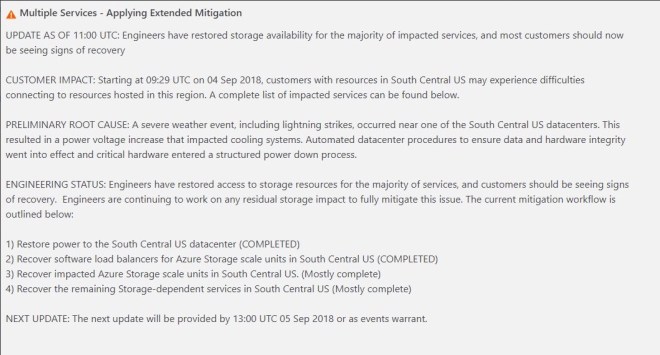
The first official Post-Mortems are starting to come out of Microsoft in regards to the Azure Outage that happened last week. While this first post-mortem addresses the Azure DevOps outage specifically (previously known as Visual Studio Team Service, or VSTS), it gives us some additional insight into the breadth and depth of the outage, confirms the cause of the outage, and gives us some insight into the challenges Microsoft faced in getting things back online quickly. It also hints at some some features/functionality Microsoft may consider pursuing to handle this situation better in the future.

As I mentioned in my previous article, features such as the new Availability Zones being rolled out in Azure, might have minimized the impact of this outage. In the post-mortem, Microsoft confirms what I previously said.

The primary solution we are pursuing to improve handling datacenter failures is Availability Zones, and we are exploring the feasibility of asynchronous replication.

Until Availability Zones are rolled out across more regions the only disaster recovery options you have are cross-region, hybrid-cloud or even cross-cloud asynchronous replication. Software based #SANless clustering solutions available today will enable such configurations, providing a very robust RTO and RPO, even when replicating great distances.

When you use SaaS/PaaS solutions you are really depending on the Cloud Service Provider (CSPs) to have an iron clad HA/DR solution in place. In this case, it seems as if a pretty significant deficiency was exposed and we can only hope that it leads all CSPs to take a hard look at their SaaS/PaaS offerings and address any HA/DR gaps that might exist. Until then, it is incumbent upon the consumer to understand the risks and do what they can to mitigate the risks of extended outages, or just choose not to use PaaS/SaaS until the risks are addressed.

The post-mortem really gets to the root of the issue…what do you value more, RTO or RPO?

I fundamentally do not want to decide for customers whether or not to accept data loss. I’ve had customers tell me they would take data loss to get a large team productive again quickly, and other customers have told me they do not want any data loss and would wait on recovery for however long that took.

It will be impossible for a CSP to make that decision for a customer. I can’t see a CSP ever deciding to lose customer data, unless the original data is just completely lost and unrecoverable. In that case, a near real-time async replica is about as good as you are going to get in terms of RPO in an unexpected failure.

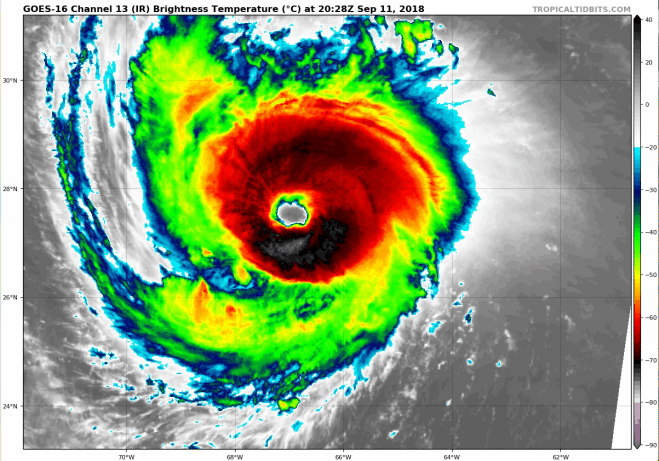
However, was this outage really unexpected and without warning? Modern satellite imagery and improvements in weather forecasting probably gave fair warning that there was going to be significant weather related events in the area.

With hurricane Florence bearing down on the Southeast US as I write this post, I certainly hope if your data center is in the path of the hurricane you are taking proactive measures to gracefully move your workloads out of the impacted region. The benefit of a proactive disaster recovery vs a reactive disaster recovery are numerous, including no data loss, ample time to address unexpected issues, and managing human resources such that employees can worry about taking care of their families, rather than spending the night at a keyboard trying to put the pieces back together again.

Again, enacting a proactive disaster recovery would be a hard decision for a CSP to make on behalf of all their customers, as planned migrations across regions will incur some amount of downtime. This decision will have to be put in the hands of the customer.
Slide 2.png
Hurricane Florence Satellite Image taken from the new GOES-16 Satellite, courtesy of Tropical Tidbits

So what can you do to protect your business critical applications and data? As I discussed in my previous article, cross-region, cross-cloud or hybrid-cloud models with software based #SANless cluster solutions are going to go a long way to address your HA/DR concerns, with an excellent RTO and RPO for cloud based IaaS deployments. Instead of application specific solutions, software based, block level volume replication solutions such SIOS DataKeeper and SIOS Protection Suite replicate all data, providing a data protection solution for both Linux and Windows platforms.

My oldest son just started his undergrad degree in Meteorology at Rutgers University. Can you imagine a day when artificial intelligence (AI) and machine learning (ML) will be used to consume weather related data from NOAA to trigger a planned disaster recovery migration, two days before the storm strikes? I think I just found a perfect topic for his Master’s thesis. Or better yet, have him and his smart friends at the WeatherWatcher LLC get funding for a tech startup that applies AI and ML to weather related data to control proactive disaster recovery events.

I think we are just at the cusp of  IT analytics solutions that apply advanced machine-learning technology to cut the time and effort you need to ensure delivery of your critical application services. SIOS iQ is one of the solutions leading the way in that field.

Batten down the hatches and get ready, Hurricane season is just starting and we are already in for a wild ride. If you would like to discuss your HA/DR strategy reach out to me on Twitter @daveberm.
Azure Outage Post-Mortem – Part 1

Lightning Never Strikes Twice: Surviving the #Azure Cloud Outage

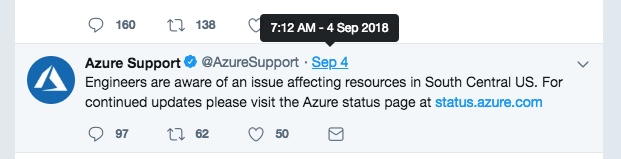
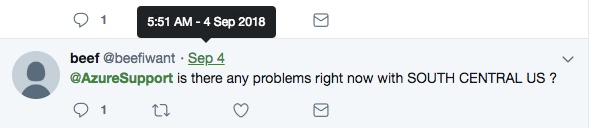
Yesterday morning I opened my Twitter feed to find that many people were impacted by an Azure outage. When I tried to access the resource page that described the outage and the current resources impacted even that page was unavailable. @AzureSupport was providing updates via Twitter.

The original update from @AzureSupport came in at 7:12 AM EDT

Azure Outage 2

Looking back on the Twitter feed it seems as if the problem initially began an hour or two before that.

Azure Support 10

It quickly became apparent that the outages had a wider spread impact than just the SOUTH CENTRAL US region as originally reported. It seems as if services that relied on Azure Active Directory could have been impacted as well and customers trying to provision new subscriptions were having issues.

Azure 11

And 24 hours later the problem has not been completely resolved and it according to the last update this morning…

Azure Outage 1

Untitled design (6)

So what could you have done to minimize the impact of this outage? No one can blame Microsoft for a natural disaster such as a lightning strike. But at the end of the day if your only disaster recovery plan is to call, tweet and email Microsoft until the issue is resolved, you just received a rude awakening. IT IS UP TO YOU to ensure you have covered all the bases when it comes to your disaster recovery plan.

While the dust is still settling on exactly what was impacted and what customers could have done to minimize the downtime, here are some of my initial thoughts.

Availability Sets (Fault Domains/Update Domains) – In this scenario, even if you built Failover Clusters, or leveraged Azure Load Balancers and Availability Sets, it seems the entire region went offline so you still would have been out of luck. While it is still recommended to leverage Availability Sets, especially for planned downtime, in this case you still would have been offline.

Availability Zones – While not available in the SOUTH CENTRAL US region yet, it seems that the concept of Availability Zones being rolled out in Azure could have minimized the impact of the outage. Assuming the lightning strike only impacted one datacenter, the other datacenter in the other Availability Zone should have remained operational. However, the outages of the other non-regional services such as Azure Active Directory (AAD) seems to have impacted multiple regions, so I don’t think Availability Zones would have isolated you completely.

Global Load Balancers, Cross Region Failover Clusters, etc. – Whether you are building SANLess clusters that cross regions, or using global load balancers to spread the load across multiple regions, you may have minimized the impact of the outage in SOUTH CENTRAL US, but you may have still been susceptible to the AAD outage.

Hybrid-Cloud, Cross Cloud – About the only way you could guarantee resiliency in a cloud wide failure scenario such as the one Azure just experienced is to have a DR plan that includes having realtime replication of data to a target outside of your primary cloud provider and a plan in place to bring applications online quickly in this other location. These two locations should be entirely independent and should not rely on services from your primary location to be available, such as AAD. The DR location could be another cloud provider, in this case AWS or Google Cloud Platform seem like logical alternatives, or it could be your own datacenter, but that kind of defeats the purpose of running in the cloud in the first place.

Software as a Service – While Software as service such as Azure Active Directory (ADD), Azure SQL Database (Database-as-Service) or one of the many SaaS offerings from any of the cloud providers can seem enticing, you really need to plan for the worst case scenario. Because you are trusting a business critical application to a single vendor you may have very little control in terms of DR options that includes recovery OUTSIDE of the current cloud service provider. I don’t have any words of wisdom here other than investigate your DR options before implementing any SaaS service, and if recovery outside of the cloud is not an option than think long and hard before you sign-up for that service. Minimally make the business stake owners aware that if the cloud service provider has a really bad day and that service is offline there may be nothing you can do about it other than call and complain.

I think in the very near future you will start to hear more and more about cross cloud availability and people leveraging solutions like SIOS DataKeeper to build robust HA and DR strategies that cross cloud providers. Truly cross cloud or hybrid cloud models are the only way to truly insulate yourself from most conceivable cloud outages.

If you were impacted from this latest outage I’d love to hear from you. Tell me what went down, how long you were down, and what you did to recover. What are you planning to do so that in the future your experience is better?

Lightning Never Strikes Twice: Surviving the #Azure Cloud Outage

“Incomplete Communication with Cluster” with local Storage Space for SQL Server cluster

When building a SANless SQL Server cluster with SIOS DataKeeper, or when configuring Always On Availability Groups for SQL Server, you may consider striping together multiple disk in a Simple Storage Space (RAID 0) for performance. This is very commonly done in the cloud where each instance typically his backed by hardware resiliency, so RAID 0 is not really all that risky.

For instance, I had a recent customer in AWS that wanted to max out his IOPS to 80,000, the maximum IOPS currently available to a single instance. Now keep in mind, only the largest EBS optimized instance sizes supports 80,000 IOPS, so you want to make sure you know what maximum IOPS your particular instance size supports.

https://docs.aws.amazon.com/AWSEC2/latest/UserGuide/EBSOptimized.html

In this case we had ac5.18xlarge instance which does support 80,000 IOPS. However, any individual EBS Provisioned IOPS volume only supports up to 32,000 IOPS. The only way to achieve 80,000 IOPS when writing to any single volume is to strip three of these volumes together in a Simple Storage Space.

Herein lies the rub, if you try to do that in an existing cluster things are going to go haywire pretty fast. Fellow MVP Joey D’Antoni recently blogged about the issue and it appears to still be an issue in the Windows Server 2019 preview.

Just as Joey suggests, I always advise my customers to build out the nodes and any Storage Spaces BEFORE they start the clustering process. This makes the process go much smoother. It also allows the customer to have some time to benchmark the server’s performance before they add any replication, to  ensure everything is working as expected.


“Incomplete Communication with Cluster” with local Storage Space for SQL Server cluster

Your student could be the next Doogie Howser of Cloud Computing with free training and cloud computing resources

Students with any interest in Information Technology or Computer Science are going to be joining a world dominated by Cloud Computing. And of course the major cloud service providers (CSP) would all love to see the young people embrace their cloud platform to host the next big thing like Facebook, Instagram or SnapChat. The top three CSP all have free offerings for students, hoping to win their minds and hearts.

But before you jump right in to cloud computing, the novice student might want to start with some basic fundamentals of computer programming at one of the many free online resources, including Khan Academy.

feature_khanacademy.png

Microsoft is offering free Azure services for students. There are two different offerings. The first is targeted at high school students ages 13+ and the second is geared towards college students 18+.

microsoft-azure-1.png

Microsoft Azure for Students Starter Offer is for those high school students that are interested in building applications in the cloud. While there are not as many free services or credits as being offered at the college level, there is certainly enough available for free to really get some hands on experience with some cutting edge technology for the self starter. How cool would it be for your high school to start a Cloud Computing Club, or to integrate this offering into some of the IT classes they may already be taking.

Azure for Students is targeted at the college level student and has many more features available for free. Any student in computer science or information technology should definitely get some hands on experience with these cutting edge cloud technologies and this is the perfect way to do it with no additional out of pocket expense.

A good way to get introduced to the Azure Cloud is to start with some free online training courses Microsoft delivers in partnership with Pluralsight.

logo_aws-educate.812809f63186598d26a56d443d829afa390566d1.png

AWS Educate. Not to be outdone, AWS also offers some free cloud services to students and educators. These seem to be in terms of free cloud credits, which if managed properly can go a long way. AWS also delivers an educational program that can be combined with an AP class in Computer Science if your high school wants to participate.


Google-Cloud-Platform.png

Google Cloud Platform (GCP) also has education grants available for computer science majors at accredited universities. These seem to be the most restrictive of the three as they are available for Computer Science Majors only at accredited universities.

GCP does also offer training, but from what I can find I don’t see any free training offerings. If you want some hands on training you will have to register for some classes. The plus side of this is that these classes all seem to be instructor led, either online or in an actual classroom. The downside is I don’t think a lot of 13 year olds are going to shell out any money to start developing on the CGP when there are other free training opportunities available on AWS or Azure.

For the ambitious young student, the resources are certainly there for you to be the next Doogie Howser of Cloud Computing.

Doogie Howser_Cloud MD_.png


Your student could be the next Doogie Howser of Cloud Computing with free training and cloud computing resources

SQL Server 2017 on Linux Availability Group Split Brain Problem

On July 18th, 2018 Microsoft published this support article with some guidance to help avoid Split Brain when using Availability Groups with SQL Server on Linux.

https://support.microsoft.com/en-us/help/4341219/split-brain-occurs-after-failover-when-using-alwayson-ags-with-externa

Running SQL Server on Linux can have some advantages, including cost savings on the OS if running in Azure. Run the numbers yourself, as the number of cores go up your cost savings year over year can be substantial, considering you are licensing at least two servers for every cluster pair.

https://azure.microsoft.com/en-us/pricing/calculator/

However, why bother saving money if the technology is not rock solid? One of the biggest issues I see with running SQL Server on Linux is the lack of a cohesive HA/DR story. On Windows, Microsoft owns the whole HA stack and SQL Server relies heavily on Windows Server Failover Clustering to support both Availability Groups and Failover Cluster Instances. This has been running well for many years and has a long track record of success stories.

When moving to Linux, Microsoft no longer owns the HA stack at the OS level and depending upon your distro of Linux, you are left trying to piece together open source solutions like Pacemaker, trying to get things to cooperate with SQL Server Availability Groups.

While you may eventually get it to work, I would much rather look to a 3rd party high availability solution like the SIOS Protection Suite for Linux (SPS-L), giving you a tried and true HA solution for your business critical applications running on Linux.

Azure-Linux-SQLServer.png
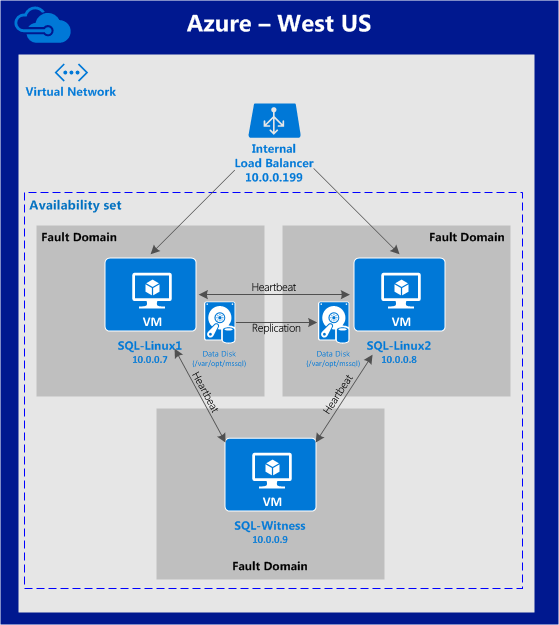
SQL Server on Linux Cluster in Azure

SPS-L has been protecting business critical applications running on Linux since 1999. It is a full HA/DR solution that monitors and recovers the entire application stack as well as the physical servers and network to ensure your business critical applications are highly available while also maintaining a 3rd copy for disaster recover in a remote datacenter or different geographic region of the cloud.

The other benefit of SPS-L is that it doesn’t require the Enterprise Edition of SQL Server, so there can be a significant cost savings advantage on SQL Server licenses as well. If you consider SQL Server Standard Edition costs $1859 per core vs $7128 per core for SQL Server Enterprise Edition, the cost savings advantage can be significant, depending upon how many cores you need to license.

Below is a video demonstration of SPS-L protecting SQL Server running on Linux in the Azure Cloud. The demonstration shows a SQL Server Standard Edition Cluster being manually failed over between nodes in different Azure Fault Domains as well as SPS-L responding to an unexpected failure.


SQL Server 2017 on Linux Availability Group Split Brain Problem

8th MVP Award

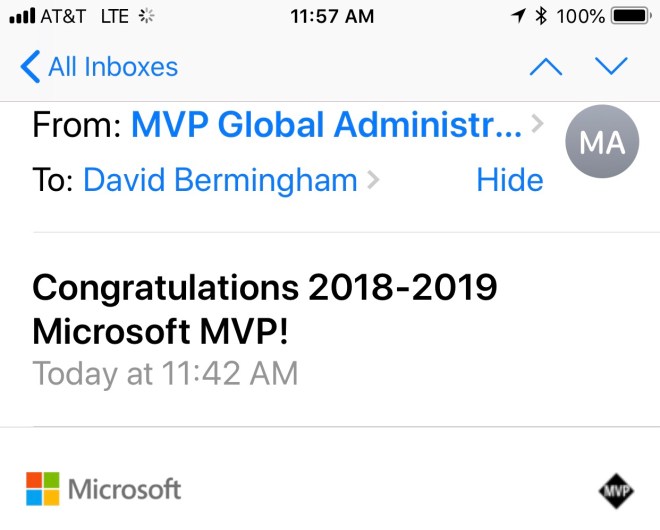
Really glad to hear today that I’ve been re-awarded the Microsoft Cloud and Datacenter Management MVP award for 2018. It’s a great honor to be counted among some of the smartest people I know. Looking forward to the launch of Windows 2019 and whatever else Microsoft have up their sleeves for Azure in 2019.

8th MVP Award

What is the network speed between Azure regions connected with Virtual Network Peering?

***Updated July 5th***

This is the question I asked myself today and of course I couldn’t find this documented anywhere. I’m assuming there is no guarantee and it probably depends on current utilization, etc. If I’m wrong, someone please point me to the documentation that states the available speed. I primarily looked here and here.

So I set up two Windows 2016 D4s v3 instances, one in Central US and one in East US 2, which are paired regions.

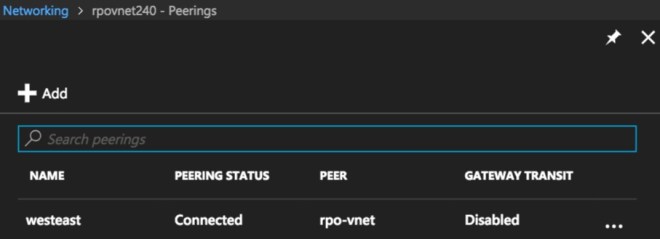
If you don’t know what peering is, it essentially lets you to easily connect two different Azure virtual networks. Peering is very easy to setup, just make sure you configure it from both Virtual Networks, I made that mistake at first. Once it is configured properly it will look something like this.

2018-06-29_17-15-14
A properly functioning peered network in Azure

I then downloaded iPerf3 on each of the servers and began my testing. At first I had some pretty disappointing results.

But then upon doing some research, I found that running multiple threads and increasing the window size reports a more accurate measurement of the available bandwidth. I tried a few different setting and seemed to max at at just about 1.9 Gbps on average, much better than 45 Mbps!

The client parameters I used to produce the best results are as follows:

iperf3.exe -c 10.0.3.4 -w32M -P 4 -t 30

A sample of that output looks something like this.

- - - - - - - - - - - - - - - - - - - - - - - - -
 [ 4] 2.00-3.00 sec 34.1 MBytes 286 Mbits/sec
 [ 6] 2.00-3.00 sec 39.2 MBytes 329 Mbits/sec
 [ 8] 2.00-3.00 sec 56.1 MBytes 471 Mbits/sec
 [ 10] 2.00-3.00 sec 73.2 MBytes 615 Mbits/sec
 [SUM] 2.00-3.00 sec 203 MBytes 1.70 Gbits/sec
 - - - - - - - - - - - - - - - - - - - - - - - - -
 [ 4] 3.00-4.00 sec 37.5 MBytes 315 Mbits/sec
 [ 6] 3.00-4.00 sec 19.9 MBytes 167 Mbits/sec
 [ 8] 3.00-4.00 sec 97.0 MBytes 814 Mbits/sec
 [ 10] 3.00-4.00 sec 96.8 MBytes 812 Mbits/sec
 [SUM] 3.00-4.00 sec 251 MBytes 2.11 Gbits/sec
 - - - - - - - - - - - - - - - - - - - - - - - - -
 [ 4] 4.00-5.00 sec 34.6 MBytes 290 Mbits/sec
 [ 6] 4.00-5.00 sec 24.6 MBytes 207 Mbits/sec
 [ 8] 4.00-5.00 sec 70.1 MBytes 588 Mbits/sec
 [ 10] 4.00-5.00 sec 97.8 MBytes 820 Mbits/sec
 [SUM] 4.00-5.00 sec 227 MBytes 1.91 Gbits/sec
 - - - - - - - - - - - - - - - - - - - - - - - - -
 [ 4] 5.00-6.00 sec 34.5 MBytes 289 Mbits/sec
 [ 6] 5.00-6.00 sec 31.9 MBytes 267 Mbits/sec
 [ 8] 5.00-6.00 sec 73.9 MBytes 620 Mbits/sec
 [ 10] 5.00-6.00 sec 86.4 MBytes 724 Mbits/sec
 [SUM] 5.00-6.00 sec 227 MBytes 1.90 Gbits/sec
 - - - - - - - - - - - - - - - - - - - - - - - - -
 [ 4] 6.00-7.00 sec 35.4 MBytes 297 Mbits/sec
 [ 6] 6.00-7.00 sec 32.1 MBytes 269 Mbits/sec
 [ 8] 6.00-7.00 sec 80.9 MBytes 678 Mbits/sec
 [ 10] 6.00-7.00 sec 78.5 MBytes 658 Mbits/sec
 [SUM] 6.00-7.00 sec 227 MBytes 1.90 Gbits/sec

I saw spikes as high as 2.5 Gbps and lows as low as 1.3 Gbps.

[Update1]

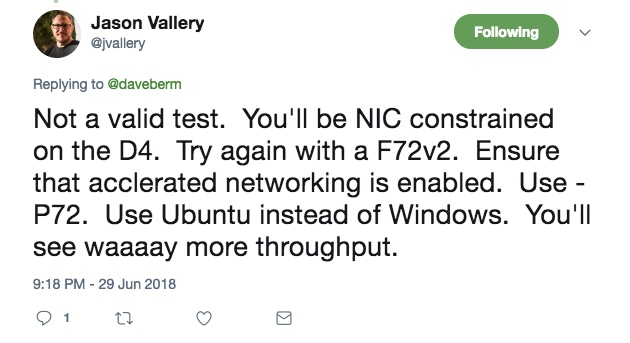
So I received some feedback from @jvallery that I must try out.

2018-07-05_13-00-14

First thing I did was bump up my existing instances to D64sv3 and used -P 64. I saw a significant increase

iperf3.exe -c 10.0.3.4 -w32M -P 64 -t 30

[SUM] 0.00-1.00 sec 2.55 GBytes 21.8 Gbits/sec

I then spun up some F72v2 instances as suggested and I saw even better results.

iperf3.exe -c 10.0.2.5 -w32M -P 72 -t 30

[SUM] 0.00-1.00 sec 2.86 GBytes 24.5 Gbits/sec


I’m not well versed enough in Linux to warrant me spending a bunch of extra money fumbling my way through configuring this on Linux, but suffice it to say there seems to be a reasonable amount of bandwidth available between Azure regions when using peered networks.

If someone wanted to repeat this test using Linux as @jvallery suggested I’ll be glad to post your results here!

[/endUpdate1]

Using these two peered networks I am helping a client address SQL Server disaster recovery using SIOS DataKeeper to asynchronously replicate SQL data between regions for disaster recovery.

2018-06-29_17-54-47
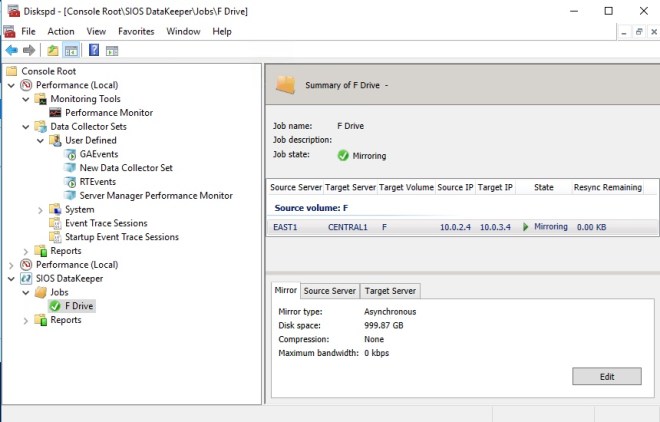
SIOS DataKeeper replicating data from Azure EAST US 2 to CENTRAL US

In this particular scenario we were measuring a RPO measured in milliseconds. As you’ll see in the video below, during a DISKSPD test meant to simulate a typical SQL Server workload the RPO was <1 second.


I’d love to hear from you regarding your experience regarding any network speed you measure in Azure and how you are using peered networks in Azure.


What is the network speed between Azure regions connected with Virtual Network Peering?

STORAGE SPACES DIRECT (S2D) FOR SQL SERVER FAILOVER CLUSTER INSTANCES (FCI)?

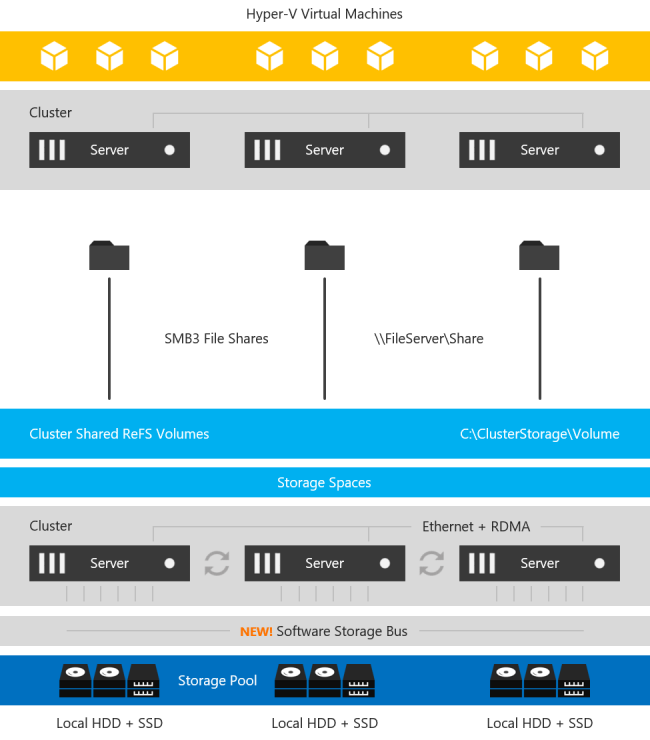
With the introduction of Windows Server 2016 Datacenter Edition a new feature called Storage Spaces Direct (S2D) was introduced. At a very high level, this solution allows you to pool together locally attached storage and present it to the cluster as a CSV for use in a Scale Out File Server, which can then be accessed over SMB 3 and used to hold cluster data such as Hyper-V VMDK files. This can also be configured in a hyper-converged (HCI) fashion such that the application and data can all run on the same set of servers.  This is a grossly over-simplified description, but for details, you will want to look here.

Storage Spaces Direct Stack

Image taken from https://docs.microsoft.com/en-us/windows-server/storage/storage-spaces/storage-spaces-direct-overview

The main use case targeted is hyper-converged infrastructure for Hyper-V deployments. However, there are other use cases, including leveraging this SMB storage to store SQL Server Data to be used in a SQL Server Failover Cluster Instance

Why would anyone want to do that? Well, for starters you can now build a highly available 2-node SQL Server Failover Cluster Instance (FCI) with SQL Server Standard Edition, without the need for shared storage. Previously, if you wanted HA without a SAN you pretty much were driven to buy SQL Server Enterprise Edition and make use of Always On Availability Groups or purchase SIOS DataKeeper and leverage the 3rd party solution which lets you build SANless clusters with any version of Windows or SQL Server. SQL Server Enterprise Edition can really drive up the cost of your project, especially if you were only buying it for the Availability Groups feature.

In addition to the cost associated with Availability Groups, there are a number of other technical reasons why you might prefer a Failover Cluster over an AG. Application compatibility, instance vs. database level protection, large number of databases, DTC support, trained staff, etc., are just some of the technical reasons why you may want to stick with a Failover Cluster Instance.

Microsoft lists both the SIOS DataKeeper solution and the S2D solution as two of the supported solutions for SQL Server FCI in their documentation here.

s2d

https://docs.microsoft.com/en-us/azure/virtual-machines/windows/sql/virtual-machines-windows-sql-high-availability-dr

When comparing the two solutions, you have to take into account that SIOS has been allowing you to build SANless Clusters since 1999, while the S2D solution is still in its infancy.  Having said that, there are bound to be some areas where S2D has some catching up to do, or simply features that they will never support simply due to the limitations with the technology.

Have a look at the following table for an overview of some of the things you should consider before you choose your SANless cluster solution.

2018-10-05_21-13-59

If we go through this chart, we see that SIOS DataKeeper clearly has some significant advantages. For one, DataKeeper supports a much wider range of platforms, going all the way back to Windows Server 2008 R2 and SQL Server 2008 R2. The S2D solution only supports the latest releases of Windows and SQL Server 2016/2017. S2D also requires the  Datacenter Edition of Windows, which can add significantly to the cost of your deployment. In addition, SIOS delivers the ONLY HA/DR solution for SQL Server on Linux that works both on-prem and in the cloud.

I’ve been talking to a lot of customers recently who are reporting some performance issues with S2D. When I tested S2D vs. DataKeeper about a year ago I didn’t see any significant differences in performance, but I did see S2D used about 2x the amount of CPU resources under the same load. This probably has to do with the high hardware requirements associated with S2D such as RDMA enabled networking and available Flash Storage, typically only available in the most expensive cloud based images.

“We recommend the I3 instance size because it satisfies the S2D hardware requirements and includes the largest and fastest instance store devices available.”

But beyond the cost and platform limitations, I think the most glaring gap comes when we start to consider that S2D does not support Availability Zones or disaster recovery configurations such as multi-site clusters or Azure Site Recovery (ASR). Allan Hirt, SQL Server Cluster guru and fellow Microsoft Cloud and Datacenter Management MVP, recently posted about this S2D limitation. In his article Revisiting Storage Spaces Direct and SQL Server FCIs  Allan points out that due to the lack of support for stretching S2D clusters across sites or including an S2D based cluster as a leg in an Always On Availability Group, the best option for DR in the S2D scenario is log shipping! This even includes replicating across Availability Zones in either Azure or AWS.

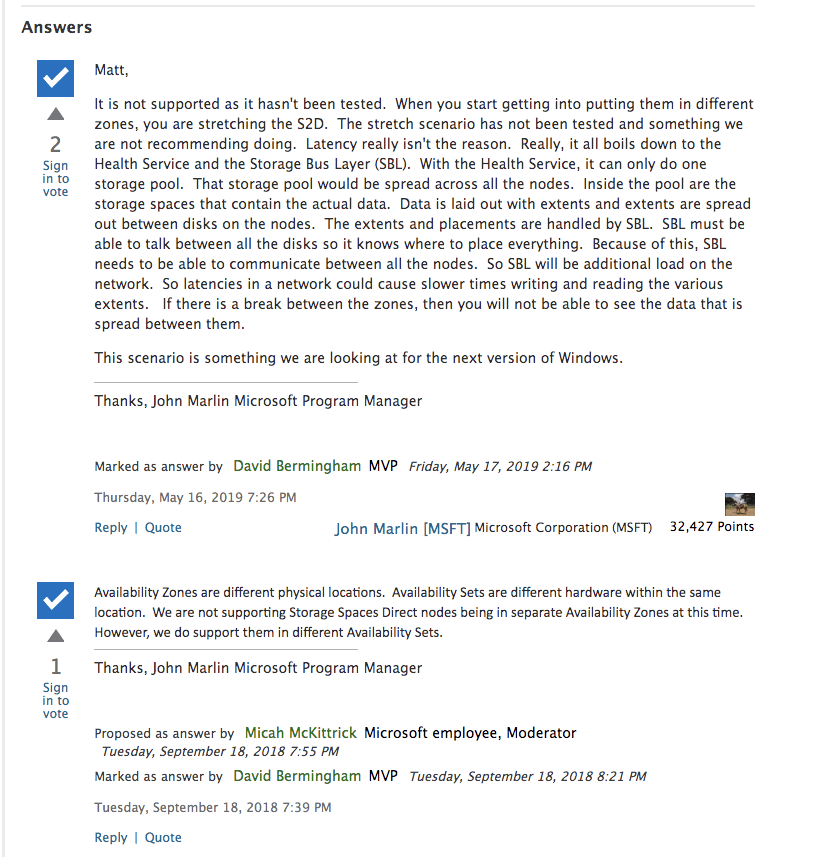
Microsoft does not make it clear in their documentation, but Microsoft’s own PM for High Availability and Storage makes it perfectly clear in the Microsoft forums.

AWS also documents S2D’s lack of Availability Zone support…

“Each cluster node must be deployed in a different subnet. This architecture will be deployed into a single availability zone because Microsoft does not currently support stretch cluster with Storage Spaces Direct. ” – AWS Documentation on S2D

Deploying S2D cluster nodes within the same Availability Zone defeats the purpose of failover clustering and the deployment does not qualify for the AWS 99.99% SLA. Even if you wanted to deploy S2D in a single Availability Zone the deployment becomes even more complicated because it is recommended that you deploy at least three cluster nodes and each node must reside in its own subnet due to some AWS networking restrictions that requires each cluster node reside in a different subnet. S2D was never designed to run in different subnets, which further complicates the solution in terms of client redirection.

You can also find this statement in Disaster Recovery Scenarios for Hyper-Converged Infrastructure | Microsoft Docs

“One item to note is that if you are familiar with Failover Clusters in the past, stretch clusters have been a very popular option over the years. There was a bit of a design change with the hyper-converged solution and it is based on resiliency. If you lose two nodes in a hyper-converged cluster, the entire cluster will go down. With this being the case, in a hyper-converged environment, the stretch scenario is not supported.”

https://docs.microsoft.com/en-us/windows-server/storage/storage-spaces/storage-spaces-direct-disaster-recovery

In contrast, the SIOS DataKeeper solution fully supports Always On Availability Groups, and better yet – it can allow you to stretch your FCI across sites to give you the best HA/DR solution you could hope to achieve in terms of RTO/RPO. DataKeeper supports Availability Zones and DR configurations that cross cloud regions. In an Azure environment, DataKeeper also support Azure Site Recovery (ASR), giving you even more options for disaster recovery.

Further complicating any S2D deployment in AWS is the reliance on “local instance store” storage, AKA, non-persistent ephemeral disks.

“The best performance for storage can be achieved using I3 instances because they provide local instance store with NVMe and high network performance”

Reliance on ephemeral storage puts your data at risk any time a disk rebuilds, which can happen at any time, but always happens when an instance is stopped. If a disk is lost and a second disk is lost before the first disk rebuilds you are looking at complete data loss and a restore from backup. If someone accidentally stops all the nodes in your cluster your data will be lost! Even if you take care to only stop one node at a time if you are not paying attention and waiting for a disk to complete a rebuild after you stop the second node you will also experience complete data loss!

The rest of this chart is pretty self explanatory. It basically consist of a list hardware, storage and networking requirements that must be met before you can deploy an S2D cluster. An exhaustive list of S2D requirements is maintained here.  https://docs.microsoft.com/en-us/windows-server/storage/storage-spaces/storage-spaces-direct-hardware-requirements

The SIOS DataKeeper solution is much more lenient. It supports any locally attached storage and as long as the hardware passes cluster validation, it is a supported cluster configuration. The block level replication solution has been working great ever since 1 Gbps was considered a fast LAN and a T1 WAN connection was considered a luxury.

SANless clustering is particularly interesting for cloud deployments. The cloud does not offer traditional shared storage options for clusters. So for users in the middle of a “lift and shift” to the cloud that want to take their clusters with them they must look at alternate storage solutions. For cloud deployments, SIOS is certified for AzureAWS and Google and available in the relevant cloud marketplace. While there doesn’t appear to be anything blocking deployment of S2D based clusters in AWS or Google, there is a conspicuous lack of documentation or supportability statements from Microsoft for those platforms.

SIOS DataKeeper has been doing this since 1999. SIOS has heard all the feature requests, uncovered all the bugs, and has a rock solid solution for SANless clusters that is time tested and proven. While Microsoft S2D is a promising technology, as a 1st generation product I would wait until the dust settles and some of the feature gap closes before I would consider it for my business critical applications.

STORAGE SPACES DIRECT (S2D) FOR SQL SERVER FAILOVER CLUSTER INSTANCES (FCI)?

Why I should convert my #Azure clusters to Managed Disks TODAY!

You may have heard about the recent storage outage that impacted some instances in the US East region back on March 16th. A root cause analysis of the outage is posted here.

March 16th US East Storage Outage

Customer impact: A subset of customers using Storage in the East US region may have experienced errors and timeouts while accessing their storage account in a single Storage scale unit

You might be asking, “What is a single Storage scale unit”. Well, you can think of it as a single storage cluster, or single SAN, or however you want to think about it. I don’t think Azure publishes their exact infrastructure, but you can probably assume that behind the scenes they are using Scale Out File Servers for backend storage.

So the question is, how could I have survived this outage with minimal downtime? If you read further down that root cause analysis you come across this little nugget.

Virtual Machines using Managed Disks in an Availability Set would have maintained availability during this incident.

What’s Managed Disks you ask? Well, just on February 8th Corey Sanders announced the GA of Managed Disks. You can read all about Managed Disks here. https://azure.microsoft.com/en-us/services/managed-disks/

The reason why Managed Disks would have helped in this outage is that by leveraging an Availability Set combined with Managed Disks you ensure that each of the instances in your Availability Set are connected to a different “Storage scale unit”. So in this particular case, only one of your cluster nodes would have failed, leaving the remaining nodes to take over the workload.

Prior to Managed Disks being available (anything deployed before 2/8/2016), there was no way to ensure that the storage attached to your servers resided on different Storage scale units. Sure, you could use different storage accounts for each instances, but in reality that did not guarantee that those Storage Accounts provisioned storage on different Storage scale units.

So while an Availability Set ensured that your instances reside in different Fault Domains and Update Domains to ensure the availability of the instance itself, the additional storage attached to each instance really represented a single point of failure. Although the storage itself is highly resilient, with three copies of your data and geo-redundant options available, in this case with a power failure the entire Storage scale unit went down along with all the servers attached to it.

So long story short…migrate to Managed Disk as soon as possible in order to help minimize downtime

https://docs.microsoft.com/en-us/azure/virtual-machines/virtual-machines-windows-migrate-to-managed-disks

And if you really want to minimize downtime you should consider Hybrid Cloud Deployments that span cloud providers or on-prem to cloud!

Why I should convert my #Azure clusters to Managed Disks TODAY!

Azure Auto Shutdown for Virtual Machines

If you are like me, I try to make my Azure MSDN subscription credits stretch the entire month. I’m typically just building labs to try out new features or to demonstrate SQL Server Failover Clusters in Azure. A lot of the time I am testing some pretty large instance sizes with plenty of premium storage. As you can imagine, you can burn through $150 pretty quick with a few GS5 instances running.

I try to be mindful and shutdown or destroy instances once I am done with them, but occasionally I’ll get pulled away for other business, only to log in the next day and see my credit has expired because I forgot to turn off the VMs.

I’m happy to see that it is now very easy to configure an automatic Shutdown of instances right in the Azure Portal.

Auto_Shutdown.png

Keep in mind however that this just shuts down the instance. If you have premium storage attached to it you will continue to pay for the Storage even if the instance is shut down.

Azure Auto Shutdown for Virtual Machines