Want SQL Server AlwaysOn Features But Can’t Afford SQL 2012 Enterprise Edition? #SQLPASS

No doubt AlwaysOn Availability Groups is a hot topic here at SQL PASS Summit. As I mentioned in my previous posts, you need to consider the overhead associated with AlwaysOn as well as other limitations, If however you can deal with the overhead and the limitations do not apply to you and you still want to deploy AlwaysOn Availability Groups you may want to have a seat when you go open your checkbook.

I priced out (list price) a 2-node solution using SQL Server 2012 AlwaysOn Availability Groups with a read-only target with a typical 2-socket, 16-core server configuration. I also added a comparable configuration running DataKeeper Cluster Edition on SQL 2012 Standard Edition and was as SQL 2008 R2 Enterprise Edition.

As you can see, deploying SQL Server 2012 Enterprise Edition (required for Availability Groups) your expense is much greater than if you deploy a similar replicated cluster solution using DataKeeper Cluster Edition.

Stop by both 351 at PASS Summit to see a demo and get more information.

Want SQL Server AlwaysOn Features But Can’t Afford SQL 2012 Enterprise Edition? #SQLPASS

How to Overcome the Limitations of SQL Server AlwaysOn Availability Groups #SQLPASS

After hearing all of the great sessions at SQL PASS Summit on Availability Groups are you thinking about biting the bullet and writing the check to upgrade to SQL Server 2012 Enterprise Edition to take advantage of this great feature? Before you get your checkbook out, stop and ask yourself these questions.

Do I use/need

  • to lower my SQL Server cost?
  • replication or log shipping?
  • to minimize the impact that replication has on the performance of my application?
  • Lync Server, Dynamics CRM or other applications that use distributed transactions?
  • to ensure that SQL Agent jobs such as database backups, optimizations, DTS and others continue to run regardless of the node in service?
  • to ensure that SQL login accounts are kept in sync between cluster nodes?
  • to minimize my administrative burden?

If you answered yes to any of these questions, you may want to reconsider your options when it comes to your SQL Server HA/DR deployment. While AlwaysOn Availability Groups certainly have their place, you may want to consider the overhead associate with them as I discussed in my previous article. Also, you really need to consider what applications will be utilizing the SQL Server database as not all applications support AlwaysOn Availability Groups, including many of Microsoft’s applications such as Lync Server and others (check your application documentation).

What I would propose instead is to consider building a traditional active/passive cluster which overcomes all of the limitations listed above, but instead of using shared storage use the cluster integrated block level replication solution from SIOS Technology called SteelEye DataKeeper Cluster Edition. Using this replication solution you are able to eliminate the SAN as a single point of failure as well as eliminate all of the limitations associated with AlwaysOn Availability Groups listed above. When you consider the possibility of using high speed local storage solutions such as @Fusionio in conjunction with DataKeeper you can have a high speed, highly available SQL Server cluster with a minimal investment in hardware and software. And best of all, this solution works with SQL 2005/2008/2008R2/2012 Standard Edition as well as Enterprise Edition, so the cost saving alone on SQL Server licensing can more than pay for the solution (more on costs saving in my next post).

You can by a 2 server pre-package solution that includes HP, Dell or Supermicro servers, Fusion-io ioDrives and DataKeeper software to help you deploy you first high speed, highly available SQL cluster. For more information see the press release here.

http://www.sqlpass.org/summit/2012/About/News/PressReleases/PartnerPressRelease9.aspx


How to Overcome the Limitations of SQL Server AlwaysOn Availability Groups #SQLPASS

How to Overcome the Performance Problems with SQL Server AlwaysOn Availability Groups #SQLPASS

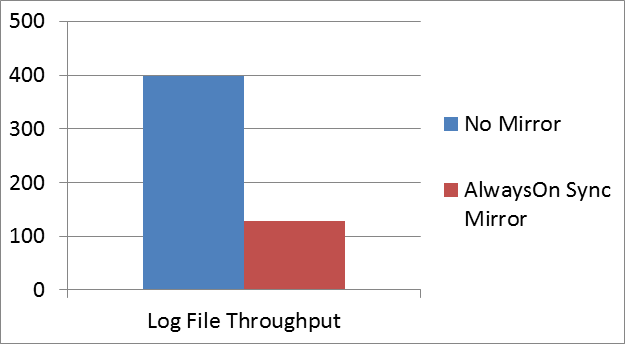
Attending the sessions at PASS Summit this week it has become obvious that AlwaysOn is a hot topic with about six sessions dedicated to the topic. The one thing that I learned is that although AlwaysOn certainly has its applications, most of the successful deployments are based on using AlwaysOn in an asynchronous fashion. The reason people avoid the synchronous replication option is that the overhead is too great. During synchronous replication any write must be committed on the replica before it is committed on the source. In the testing that I have done, this overhead introduced can be as much as 68%.

For example, in a test where I have a database inserting about 1,000,000 rows per second and we measure the throughput on the log file, we see that with no mirroring in place we are writing about 400 MBps. Once we start replicating that database with AlwaysOn Availability Groups across a 10 Gbps LAN, we see about a 68% drop off in performance, with this particular database slowing down to about 250,000 inserts per second.

Figure 1 – MBps written to a SQL Server database before and after AlwaysOn Synchronous Mirroring

If you are considering AlwaysOn as a replacement to your failover cluster, this drop off should be of a major concern to you. In order to achieve the automatic failover that you are accustomed to in failover clustering, you must use synchronous mirroring, which means that you must live with this performance hit. Generally this is not going to be acceptable, which is probably why you don’t hear the experts recommending such configurations on a regular basis.

So what should you do? Should you stick with you traditional failover cluster and a SAN? What if you want to take advantage of fast, high speed storage such as Fusion-io? In that case, you can’t use a traditional cluster…or can you?

The good news is that you can build a cluster without a SAN and do it all without the expense, limitations and overhead associate with AlwaysOn Availability Groups (more on the limitations and expense in my next blog post). By using DataKeeper Cluster Edition you can build clusters without shared storage AND the overhead associated with Synchronous replication is closer to 10% vs. the close to 70% we see with AlwaysOn Availability Groups.

Come to booth 351 at #SQLPASS and I’ll be glad to demonstrate how the solution works.

How to Overcome the Performance Problems with SQL Server AlwaysOn Availability Groups #SQLPASS

Hurricane Sandy Disaster Recovery for Business

My thoughts and prayers go out to those affect by this massive storm. Although I live in NJ, my neighborhood remained relatively unscathed other than some downed trees and power lines. The pictures coming in from the coastal communities up and down the eastern seaboard show that many people did not fare as well. I’m hopeful that most of the damage is property that can be rebuilt, but I am sorry to hear that some people lost their lives and I can only imagine the pain of their friends and family – I am truly sorry for their loss.

As an employee of a company that specializes in disaster recovery software, I am also privy to many stories of companies that lost data that cannot be replaced. Many of these companies never recover from such catastrophes, but those that do are usually the ones who immediately look to put into place a plan that includes some sort of real-time data protection that includes replicating their critical data offsite or to some cloud repository so they are never caught in such a predicament again. If that is your story or even if you were lucky enough to avoid disaster this time but want to prepare ahead, please contact me immediately so I can help you assess your risks and recommend some data protection and disaster recovery solutions to help mitigate the risks.

Hurricane Sandy Disaster Recovery for Business

Achieving High Performance and High Availability for SQL Server

Register here to learn how high performance and high availability for Microsoft SQL Server can be achieved with solutions from Fusion-io and SIOS. This powerful combination delivers high-speed storage and high availability for SQL Server without the limitations of single copy clusters or AlwaysOn Availability Groups.

Make the switch and enjoy:

– Cost savings

– Higher database performance

– Smaller floor space requirements

– Lower cooling and power demands

… all without sacrificing availability.

The end result: faster performance at a fraction of the cost of a typical SAN with 100% data availability.

Featured Speakers:

Dave Bermingham is recognized within the technology community as a high availability expert and has been a Microsoft MVP in Clustering for the past three years. David’s work as Sr. Technical Evangelist at SIOS has him focused on delivering high availability and disaster recovery solutions. David holds numerous technical certifications and has over twenty years of technology experience focused on application availability.

Jamila Gunawardena is a Senior OEM Sales Engineer for Fusion-io. Jamila has over 15 years experience in Software Engineering and System Design with expertise in Internet, Bioinformatics, and Semiconductor DFM solutions. Currently, Jamila is focused on ISV and appliance partnerships at Fusion-io.

Geoff Hiten is a Microsoft SQL MVP and is currently an Infrastructure Architect for Intellinet. Geoff began working with SQL Server in 1992 with version 4.2 and has used every version since. He specializes in high-availability and high-performance SQL systems. Geoff is heavily involved in the Microsoft SQL Server Community and was initially awarded MVP status in 2004. Geoff was appointed in 2011 to fill an interim Director position at the National PASS organization.

Achieving High Performance and High Availability for SQL Server

SQL Server 2012 “Standard Edition” Availability Options

Microsoft has announced that some of the most widely anticipated availability options being introduced with SQL Server 2012, including AlwaysOn Availability Groups, will only be available with the Enterprise Edition of SQL. The cost of SQL Server Enterprise is $27,496 for any server that has up to 4 physical processors vs. $7,172 for Standard Edition. If you plan on taking advantage of the “Read-Only” replica, you can double the cost of the solution ($54,992) since you have to license both the source and the target server. When you start talking about that kind of money, you begin to wonder if there is an alternative to AlwaysOn Availability Groups.

The good news is that Microsoft still allows you to build 2-node clusters using SQL Server Standard Edition, and since this is generally deployed in an active-passive configuration you do not have to license the standby server. So for $7,172 you can build a pretty robust 2-node SQL cluster, assuming you have an enterprise class SAN that you can use to store your cluster data.

What’s that you say, you don’t have a SAN? Or you’d rather build a solution that eliminates the SAN as a single point of failure and instead allows you to use data replication to keep the data in sync between cluster nodes the way that AlwaysOn Availability Groups allows you to? Or perhaps you want to use take advantage of the speed offered by local attached SSD drives such as those offered by Fusion-IO, but yet don’t want to give up on availability?

You’ll be glad to know that for the cost of a single copy of SQL Server 2012 Standard Edition and the very affordable addition of SteelEye DataKeeper Cluster Edition, you’ll be able to deploy 2-node SQL Server 2012 Standard Edition clusters with data replication for about half the cost of a 2-node SQL Server Enterprise Edition AlwaysOn Availability Group and about ¼ of the price of a AlwaysOn Availability Group with read-only targets.

Not only will you be able to save money, but if you answer yes to any of the following questions, AlwaysOn Availability Groups probably wasn’t the best solution for you to begin with and you would be better served by Windows Server Failover Clustering and DataKeeper Cluster Edition.

  • Am I concerned about the cost of SQL Server Enterprise Edition?
  • Do I use replication or log shipping?
  • Do I need to support Lync Server or other applications that use distributed transactions?
  • Do I need to ensure that SQL Agent jobs such as database backups, optimizations, DTS and others continue to run regardless of the node in service?
  • Do I need to ensure that SQL login accounts are kept in sync between cluster nodes?
  • Do I want to minimize my administrative burden?

The following chart summarizes your SQL Server 2012 availability options, including the 3rd option which is to build a traditional SQL cluster using Windows Server Failover Clustering with DataKeeper Cluster Edition.
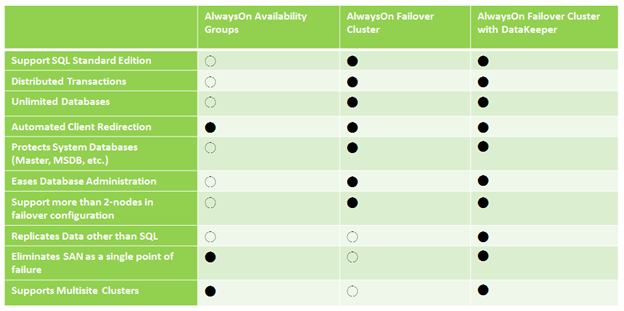
As you can see, Failover Clustering with DataKeeper Cluster Edition is not only going to save you money, it also is going to help you overcome some of the inherent limitations of AlwaysOn Availability Groups.

About the only thing you can’t do with the DataKeeper solution is to have read-only targets. As I mentioned earlier, read-only targets requires a second SQL license, so to have that feature will cost you minimally $54,938. If you really must have read-only targets you’ll be glad to know that you can mix AlwaysOn Failover Clusters with DataKeeper and AlwaysOn Availability Groups if you like. Basically you would wind up with a 2-node SQL failover cluster with DataKeeper and a single standalone SQL Server acting as a read-only target for an AlwaysOn Availability Group. In that case, you would still need two copies of SQL Server Enterprise Edition, one for the cluster and one for the read-only target.

I demonstrated this solution at Tech-Ed 2011 in Atlanta last year and got a lot of really positive feedback. This particular demonstration shows a 2-node multisite cluster, but the same concept can be applied to single site clusters.

https://clusteringformeremortals.com/2011/05/15/sql-server-denali-hadron-multisite-cross-subnet-failover-video-demonstration/

If you have any questions about this article please leave me a comment, I’d be glad to discuss it with you further.

SQL Server 2012 “Standard Edition” Availability Options

SQL Server 2012 Disaster Recovery – Multisite Clusters

Microsoft just released a great white paper on new support for multisite clusters in SQL Server 2012 for Disaster Recovery. Don’t forget that I blogged about this feature back in May of 2011 and even included a video demonstration which shows a SQL Server 2012 multisite failover cluster for disaster recovery using SteelEye DataKeeper Cluster Edition.

https://clusteringformeremortals.com/2011/05/15/sql-server-denali-hadron-multisite-cross-subnet-failover-video-demonstration/

SQL Server 2012 and cross subnet failover capabilities will open up a whole new world of possibilities for people looking for disaster recovery options for SQL 2012.

SQL Server 2012 Disaster Recovery – Multisite Clusters

Do You Have to Sacrifice High Availability for High Performance?

Mosey on over to the Fusion-io website and read my guest post in their blog, Do You Have to Sacrifice High Availability for High Performance? After you are done there, view the joint SIOS and Fusion-io webinar “SQL Server 2008 – High Performance and High Availability Through Fusion-io and SIOS”

Part of this webinar includes some VERY interesting benchmark information…you won’t want to miss it!

Do You Have to Sacrifice High Availability for High Performance?

Hyper-V Replica Coming in Windows Server “Next”

Here is an interesting video that demonstrates “Hyper-V Replica”, a new feature coming in the next version of Windows. Skip to the 39 minute mark to see the demonstration.

http://digitalwpc.com/Videos/AllVideos/Permalink/3cb3788c-5c47-4b9e-987c-0dec4194058b/#fbid=slfi0dmNMqP

It looks like a very welcome feature that certainly will make Hyper-V even more competitive when comparing the feature set vs. price between vSphere and Hyper-V, especially with the new pricing announced by VMware.

I’ll be very curious to see if this integrates with Windows Server Failover Clustering to allow you create shared nothing clusters as you can today with 3rd party replication software like SteelEye DataKeeper Cluster Edition as I demonstrated in an earlier blog post.

https://clusteringformeremortals.com/2009/09/17/hyper-v-live-migration-across-data-centers/

Hyper-V Replica Coming in Windows Server “Next”