SQL Server 2012 Disaster Recovery – Multisite Clusters

Microsoft just released a great white paper on new support for multisite clusters in SQL Server 2012 for Disaster Recovery. Don’t forget that I blogged about this feature back in May of 2011 and even included a video demonstration which shows a SQL Server 2012 multisite failover cluster for disaster recovery using SteelEye DataKeeper Cluster Edition.

https://clusteringformeremortals.com/2011/05/15/sql-server-denali-hadron-multisite-cross-subnet-failover-video-demonstration/

SQL Server 2012 and cross subnet failover capabilities will open up a whole new world of possibilities for people looking for disaster recovery options for SQL 2012.

SQL Server 2012 Disaster Recovery – Multisite Clusters

Do You Have to Sacrifice High Availability for High Performance?

Mosey on over to the Fusion-io website and read my guest post in their blog, Do You Have to Sacrifice High Availability for High Performance? After you are done there, view the joint SIOS and Fusion-io webinar “SQL Server 2008 – High Performance and High Availability Through Fusion-io and SIOS”

Part of this webinar includes some VERY interesting benchmark information…you won’t want to miss it!

Do You Have to Sacrifice High Availability for High Performance?

SQL Server Denali HADRON Multisite Cross Subnet Failover Video Demonstration

The crowd has spoken and the SQL Server Team has answered! Denali is the first version of SQL Server to support the cross subnet failover feature first introduced in Windows Server 2008 Failover Clustering. It seems like we have been waiting forever for the SQL team to support this feature but the wait is finally drawing to an end.

The following is a link to a 5 minute video that demonstrates a 3-node cluster Denali cluster with two nodes in the primary datacenter and one node in the DR site in a separate subnet.

http://screencast.com/t/ni1zqMOIv

I will be demonstrating this solution at Tech-Ed 2011 in Atlanta this week. Stop by the SIOS Technology booth and have a look for yourself at the SQL Server Denali multisite cluster demonstration using SteelEye DataKeeper.

SQL Server Denali HADRON Multisite Cross Subnet Failover Video Demonstration

Microsoft multisite cluster users rejoice – it is now possible to have automatic failover in a 3 node cluster!

Microsoft recently released a patch that allows you to specify whether or not a cluster node can vote in in a majority quorum model. This is particularly useful in a multisite cluster configuration that consists of an even number of nodes.

http://support.microsoft.com/kb/2494036

Consider the following…

I have a two node cluster in a local site high availability and I wish to extend it to a 3rd location and add a single node for disaster recovery. Sound like a great plan as a multisite cluster is just about the most robust DR plan you can implement. However, you will not be able to take advantage of one of the best features of a multisite cluster – automatic recovery in the event of a site loss. If you were to lose your primary site the DR site only contains one cluster node (see Figure 1). This is just one vote out of three in the cluster so a majority cannot be obtained and Node3 will not come online automatically. The only way to make Node3 come online is to force the quorum online, which kind of defeats the purpose of multisite cluster by requiring human intervention for a failover to happen.
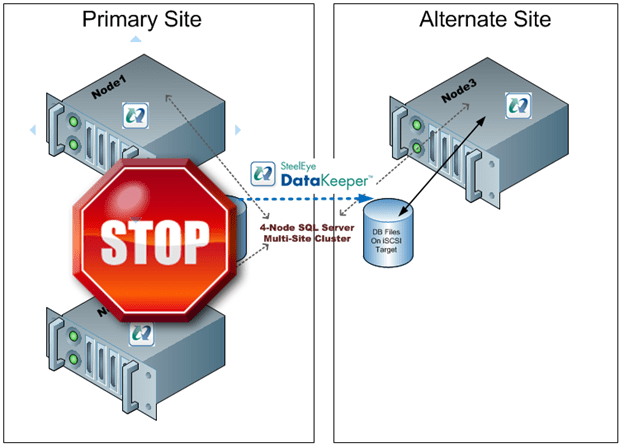
Figure 1 – In a typical 3 node multisite cluster if you lose the primary site the DR site cannot obtain majority so failover never occurs.


The only “safe” way to have automatic failover in a multisite cluster is to have an equal number of nodes in each site and to have a file share witness in a 3rd location with connectivity back to both the primary site and the DR site. This concept is a little difficult to grasp at first, so let me attempt to explain through illustrations.
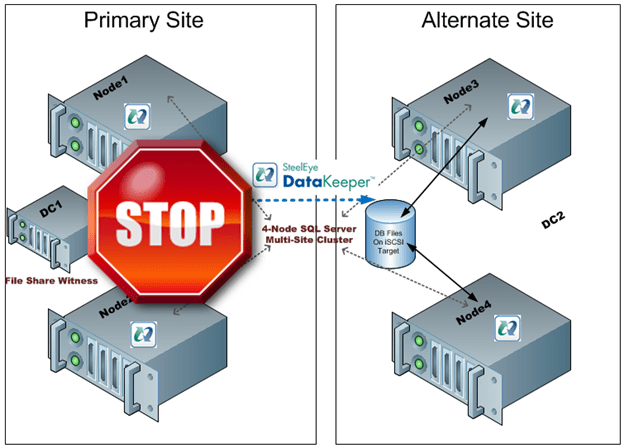
Figure 2- With an even number of nodes in both locations and the file share witness in the primary site a loss of the primary site would not result in a failover as the Alternate Site would only have 2 out of 5 votes, not a majority.
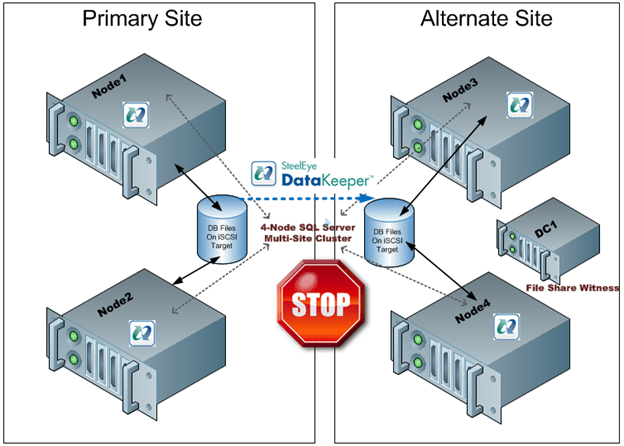
 

Figure 3 – If the file share witness was moved to the Alternate Site a failure of the WAN would cause a false failover as the Alternate Site would form a majority and come online.
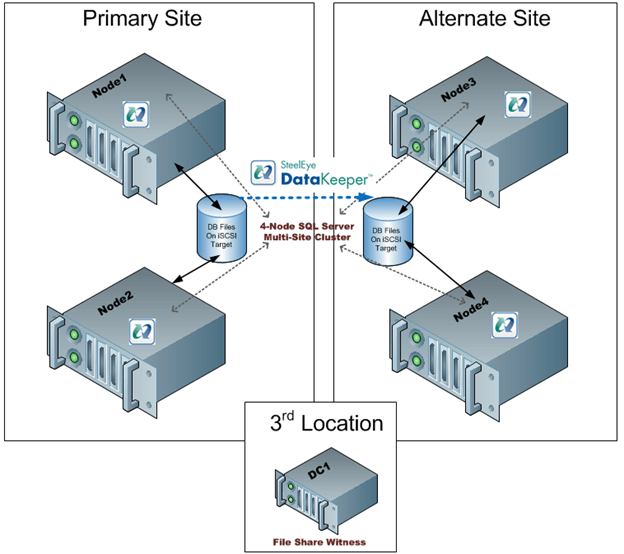
 

Figure 4 – with the file share witness in a 3rd location failover will occur if the Primary Site is lost and false failovers are avoided in the case of connectivity failure between the Primary and Alternate Site.

As you can see, figure 4 represents the only reasonable configuration which supports automatic failover. However, this assumes that there are an equal number of nodes in each location. If you are stuck with the original 3-node configuration you are stuck as adding a file share witness does not help as you can never achieve a majority in the alternate site…until today! Microsoft release a patch that basically allows you to specify whether or not a node gets to vote or not. So what this means is you can build a 3-node cluster as illustrated in Figure 1, yet take advantage a file share witness in a 3rd location as illustrated in Figure 4. By simply telling one of the nodes in the Primary Site to note vote in the cluster you will allow the Alternate Site to form a majority with the file share witness and come online. Assuming connectivity to your 3rd location and Alternate Site is relatively reliable there really is no downside to the configuration shown in Figure 5.
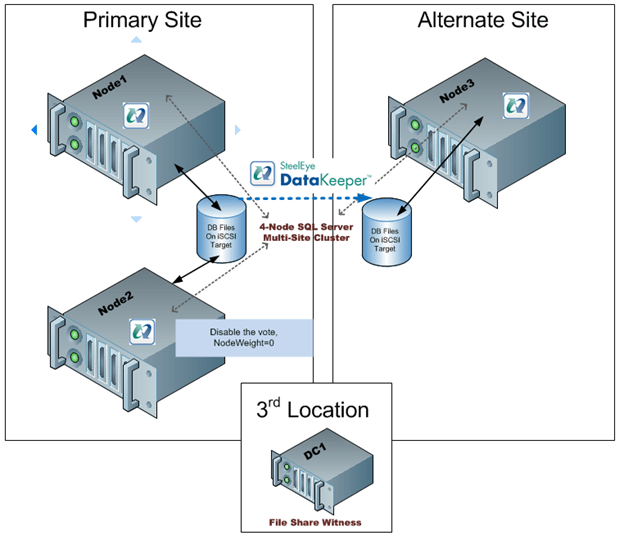
Figure 5 – by disabling the vote on Node2 you can deploy a 3-node multisite cluster with a file share witness and safely support automatic failover to the DR site. The same concept can be applied to any cluster with an odd number of nodes.

While this is a great solution, you still need that 3rd location for the file share witness. If you don’t have that 3rd location you will just have to settle for a manual switchover and keep the file share witness in the primary site if you have an even number of nodes.

The PreventQuorum switch is also included as part of this hotfix which will also be of interest to people deploying multisite clusters. Well explore that option in a future article.

Get the hot fix here…

A hotfix is available to let you configure a cluster node that does not have quorum votes in Windows Server 2008 and in Windows Server 2008 R2

http://support.microsoft.com/kb/2494036

Microsoft multisite cluster users rejoice – it is now possible to have automatic failover in a 3 node cluster!

Step-by-Step: How to extend a traditional Microsoft shared storage failover cluster into a multisite cluster with hybrid shared/replicated storage using SteelEye DataKeeper Cluster Edition

Introduction

The following are the high level steps required to turn an existing 2-node File Server cluster into a 3-node multisite cluster using SteelEye DataKeeper Cluster Edition. The same steps can be applied to most cluster resource types including Hyper-V, DHCP, Generic Service, etc. However, if you are working with a SQL Server cluster the steps will be slightly different as adding a node to the cluster is done through the SQL installation process and not the Failover Cluster Manager.

These instructions assume you have at least base level knowledge of Windows Server Failover Clustering and some familiarity with SteelEye DataKeeper Cluster Edition. Also, these instructions do not address any changes which may be required to support cross subnet failover utilizing the new “OR” functionality introduced in Windows Server 2008 R2. For further information on deploying multisite clusters refer to the following resources:

Step 1 – Start with a traditional shared storage cluster

Step 2 – Remove any Physical Disk resources from the clustered service

Step 3 – Delete the Cluster Disk from Available Storage

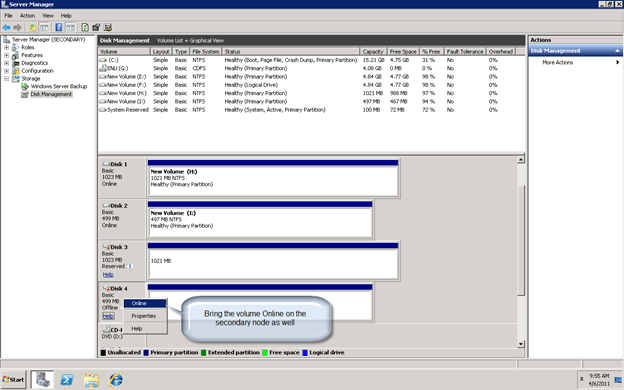
Step 4 – Bring the shared volume Online on all cluster nodes

Step 5 – Verify that the volumes brought online all have the same drive letter across cluster nodes. At this time Disk Management may not display the drive letters but you should be able to verify the drive letters through Windows Explorer.

Step 6 – Change your Quorum type to node majority (if you will have an odd number of nodes) or Node and File Share Majority (if you have an even number of nodes).
[EDIT] – This is no longer necessary as of Windows Server 2016 since the quorum is maintained with Dynamic Quorum and Dynamic Witness

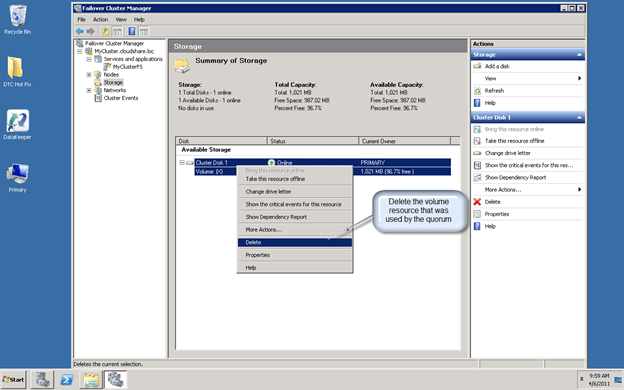
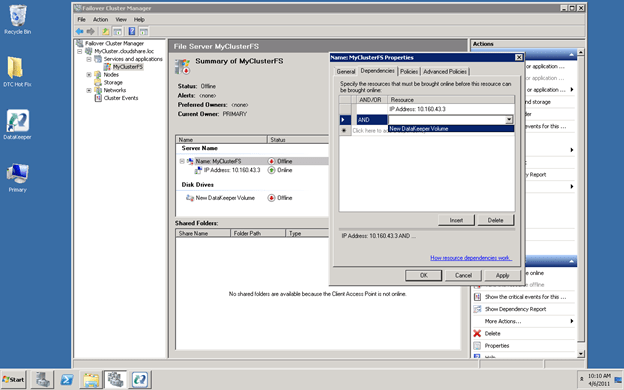
Step 7 – Delete the volume resource that is in Available Storage

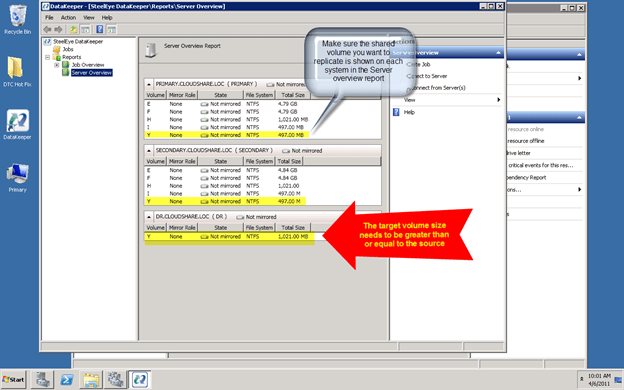
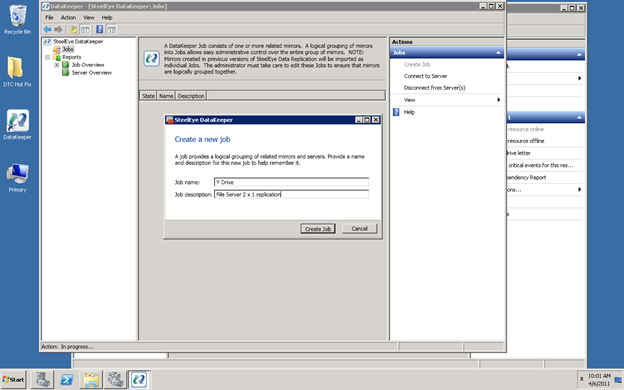
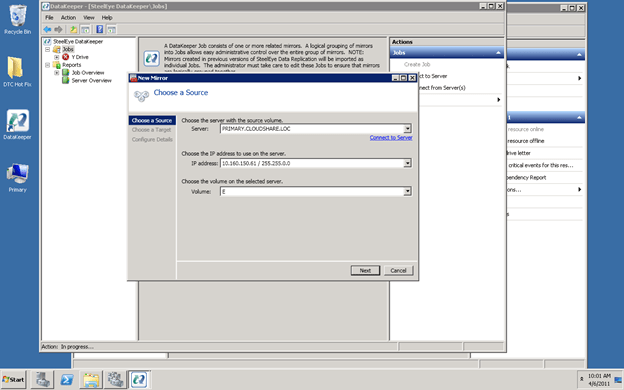
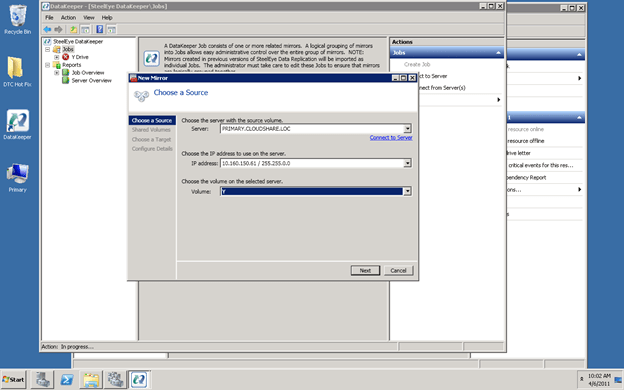
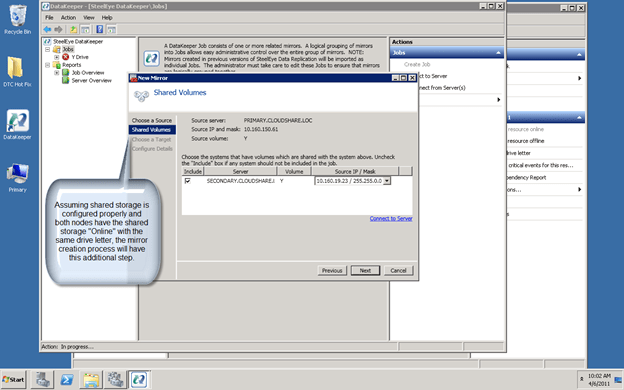
Step 8 – Create your mirror

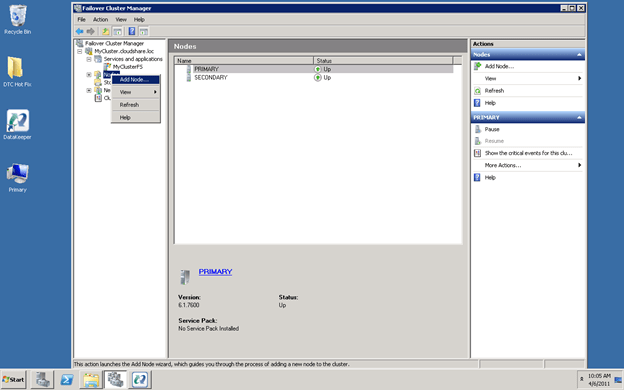
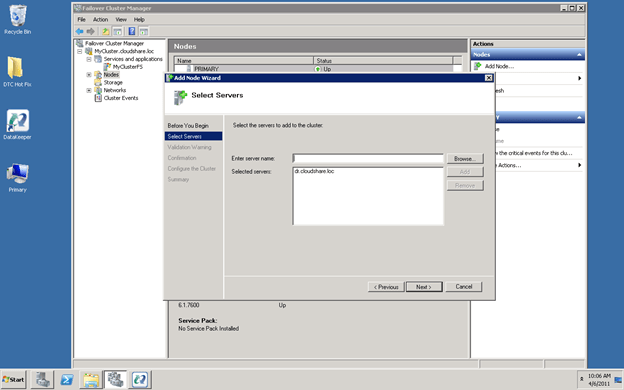
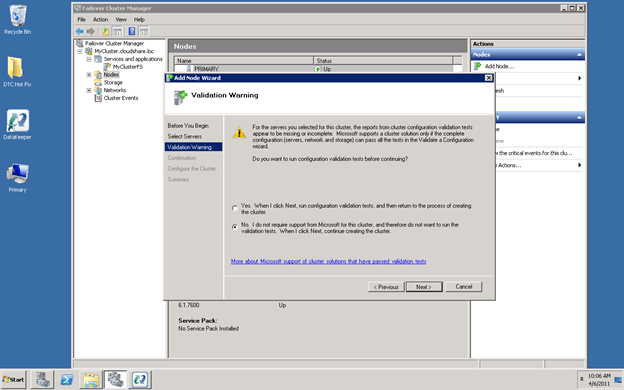
Step 9 – Add the remote Node to the cluster*

* IMPORTANT NOTE
If you are using Windows Server 2008 R2 SP1 , you must not do this step through the Failover Cluster Manager GUI. Changes were made in SP1 to support symmetric storage however these changes actually make deploying multisite clusters more complicated in some circumstances. If you are using SP1 and want to add a node to a multisite cluster that is using a 3rd party storage class resource like DataKeeper, the only way to add a node without causing the cluster disks resources to be added back into the cluster (which really causes a mess to clean up) is to use PowerShell to add the node as described here http://technet.microsoft.com/en-us/library/ee461047.aspx

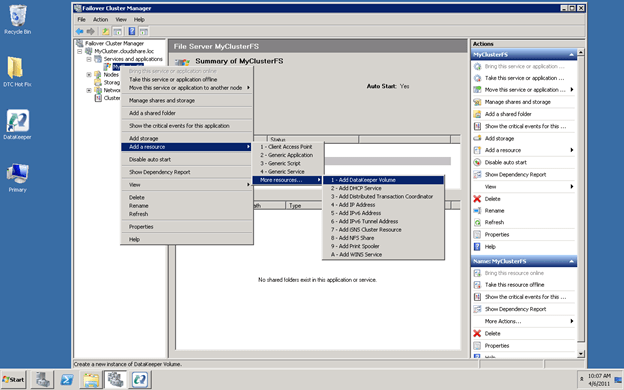
Step 10 – Add the DataKeeper Volume Resource

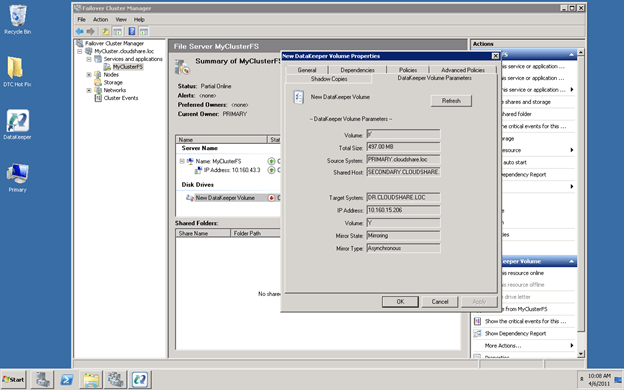
Step 11 – Change the DataKeeper Volume Parameters to associate it with the replicated volume

Step 12 – Redefine the cluster dependencies

Step 13 – Reboot the 3rd node to ensure the DataKeeper volume resource type is registered in Failover Clustering

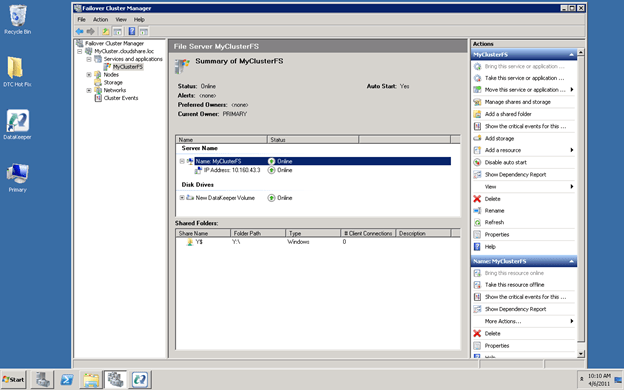
Step 14 – Test your new multisite cluster

Keep in mind that only a shared source or the current target of a mirror can come online; you cannot bring a shared target online if it is not the current target of the mirror. In an unexpected failure Windows will follow the preferred owners list until it finds a node that is available to come online. In a manual Online if you try to bring a node Online that is not a shared source or a current target the Online will fail and the current node will remain online. Check the DataKeeper GUI to verify which node is currently the target of the mirror. [EDIT] – As of Windows Server 2016 it is advisable to create two different cluster sites and group the two local clusters in Site1 and the DR node in Site2. This ensures that failover only happens locally, unless all the local nodes have failed. Cluster Site Awareness is described in this blog post https://techcommunity.microsoft.com/t5/failover-clustering/site-aware-failover-clusters-in-windows-server-2016/ba-p/372060

Step-by-Step: How to extend a traditional Microsoft shared storage failover cluster into a multisite cluster with hybrid shared/replicated storage using SteelEye DataKeeper Cluster Edition

Microsoft now officially supports the iSCSI Software Target 3.3 in production

Just a few weeks ago I wrote an article about how to configure the iSCSI Software Target 3.3 in a cluster environment. While it is great for labs and testing, up until today it was not supported in a production environment. Well…that all changes today! Microsoft just announced that the iSCSI Software Target 3.3 is a freely available download and can be used on a production network.

http://blogs.technet.com/b/josebda/archive/2011/04/04/microsoft-iscsi-software-target-3-3-for-windows-server-2008-r2-available-for-public-download.aspx

This all starts to get interesting once you start considering the possibility of building shared nothing iSCSI Target clusters with DataKeeper Cluster Edition. Build 2-nodes locally for HA and then place a 3rd one in a remote data center for disaster recovery. Now that is a pretty sweet HA/DR solution without having to break the bank!

Microsoft now officially supports the iSCSI Software Target 3.3 in production

SQL Server Denali and HADRON

Microsoft’s latest version of SQL, code named Denali, is currently in CTP. One of the most anticipated feature is something called HADRON. Basically, it is has been described as mirroring 2.0. The best features of HADRON as I can see compared to mirroring as it is in 2005/2008 are as follows:

  • You can query the mirror (now known as a replica)
  • You can have more than one replica
  • Database are grouped into availability groups to ensure related databases always fail over together
  • Support for replicating more than 10 databases

If you want a great preview, check out fellow MVP Brent Ozar’s post, SQL Server Denali Rocks!

From reading Brent’s post I gather Microsoft only plans to include this in the Enterprise version of SQL. That is too bad for the many customers running SQL Server Standard as traditionally there is a significant price jump to go from Standard to Enterprise. However, that is good news for the 3rd party replication vendors out there who are providing similar functionality today on SQL 2005/2008 on Standard and Enterprise Editions.

While it is not an exact duplicate of HADRON, a multisite cluster using SteelEye DataKeeper Cluster Edition for SQL Server gives you a great solution for HA/DR without requiring shared storage. So while we wait for Denali and all the application vendors to start supporting Denali you might want to have a look at what SteelEye DataKeeper Cluster Edition can do for you today!

SQL Server Denali and HADRON

Office 2010 and SharePoint 2010 Beta Preview

I have been using the Office 2010 Beta now for the past few months and I absolutely love it. However, I think I will love it even more once I am in a fully integrated environment with SharePoint 2010, Exchange 2010 and Windows 2008 R2. Fortunately, you can have a look at all of this great new technology without spending a bunch of time downloading, installing and configuring the software. Microsoft has released a pre-configured Hyper-V virtual machine bundle that includes Office 2010 and SharePoint 2010 pre-configured and pre-populated with some data for the fictional Contoso.com organization. I imagine this would be a great sales tool if you are trying to convince your customers to upgrade to the latest and greatest Microsoft products.

Get the VMs here…

http://www.microsoft.com/downloads/details.aspx?FamilyID=0c51819b-3d40-435c-a103-a5481fe0a0d2&displaylang=en

Office 2010 and SharePoint 2010 Beta Preview

Microsoft SQL Server 2005/2008 Multi-Site Cluster for Disaster Recovery


Join us for a Webinar on January 28
 
 
Space is limited.
Reserve your Webinar seat now at:
https://www2.gotomeeting.com/register/378084954
 
Join us David Bermingham, SteelEye’s Director of Product Management, discusses the benefits of using Windows Server 2008 Failover Clustering to enable multi-site SQL Server clusters for disaster recovery.   David will also give a step-by-step illustration on how to configure a SQL Server 2008 multi-site cluster using SteelEye DataKeeper Cluster Edition and Windows Server 2008 R2 Failover Clustering.
 
Title:    Microsoft SQL Server 2005/2008 Multi-Site Cluster for Disaster Recovery
     
Date:   Thursday, January 28, 2010
     
Time:   9:00 AM – 10:00 AM EST
 
After registering you will receive a confirmation email containing information about joining the Webinar.


System Requirements
PC-based attendees
Required: Windows® 2000, XP Home, XP Pro, 2003 Server, Vista
 
Macintosh®-based attendees
Required: Mac OS® X 10.4 (Tiger®) or newer
 
Microsoft SQL Server 2005/2008 Multi-Site Cluster for Disaster Recovery