MVP for another year

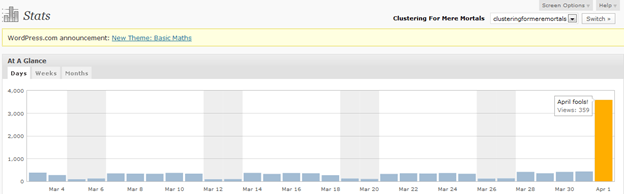
I am very happy to announce that I have been elected Microsoft Most Valuable Professional (MVP) in Clustering for a second year in a row. It is a great honor and I certainly enjoy the benefits of being recognized as an MVP, including free dinners and drinks wherever I go! Well, OK, that is just my imagination getting the better of me but I did enjoy the MVP Summit and meeting lots of really smart people. In addition to being elected MVP I had the best day ever on my blog, until I discovered that WordPress played an April fool’s day joke on me! I thought that my being elected MVP must have been the headline on CNN or something. They really got me good!


MVP for another year

You might want to hold off on the SP1 upgrade for your cluster

There are some reports on the newsgroups of storage validation failures after upgrading 3+ node clusters to Windows Server 2008 R2 SP1. It seems Microsoft is aware of the issue and they are investigating. I have been following this thread to keep up to date on the issue

http://social.technet.microsoft.com/Forums/en-US/winserverClustering/thread/e67026af-7f9b-4698-9ca7-11853431ed86

You might want to wait for some sort of resolution before you apply SP1 to your clusters.


You might want to hold off on the SP1 upgrade for your cluster

Configuring the Microsoft iSCSI target software for use in a cluster

Now that Starwind has stopped offering a free, limited version of their iSCSI target software you might be looking for an alternative for your labs. Microsoft has recently made their iSCSI target software available as part of the Windows Storage Server 2008 R2 download on Tech-Net and MSDN. It is not for use in production and has some of its own licensing restrictions, but it works fine and it is free for Tech-Net and MSDN subscribers.

I recorded some really quick and dirty videos that aim to show you how to configure the iSCSI target and iSCSI initiator software in under 7 minutes. At the end, you will have a shared disk array ready to start your shared storage cluster. Hopefully when I get some more time I’ll actually write these steps out, but in a pinch this will give you the general idea of what needs to be done. There are plenty of other features, but for a lab environment this will do the trick.

http://screencast.com/t/2qUUDvZo6Zka – configuring the iSCSI target software and iSCSI initiator on the client

http://screencast.com/t/7m9ElSIdAbP – configuring the iSCSI initiator….continued

Configuring the Microsoft iSCSI target software for use in a cluster

Microsoft Virtualization for VMware Professionals – Free Online Classes – March 29 – 31

Just one week after Microsoft Management Summit 2011 (MMS), Microsoft Learning will be hosting an exclusive three-day Jump Start class specially tailored for VMware and Microsoft virtualization technology pros.  Registration for “Microsoft Virtualization for VMware Professionals” is open now and will be delivered as a FREE online class on March 29-31, 2010 from 10:00am-4:00pm PDT.


What’s the high-level overview?

  • This cutting edge course will feature expert instruction and real-world demonstrations of Hyper-V and brand new releases from System Center Virtual Machine Manager 2012 Beta (many of which will be announced just one week earlier at MMS).  Register Now!
  • Day 1 will focus on “Platform” (Hyper-V, virtualization architecture, high availability & clustering)
    • 10:00am – 10:30pm PDT:  Virtualization 360 Overview
    • 10:30am – 12:00pm:  Microsoft Hyper-V Deployment Options & Architecture
    • 1:00pm –   2:00pm:  Differentiating Microsoft and VMware (terminology, etc.)
    • 2:00pm –   4:00pm:  High Availability & Clustering
  • Day 2 will focus on “Management” (System Center Suite, SCVMM 2012 Beta, Opalis, Private Cloud solutions)
    • 10:00am – 11:00pm PDT:  System Center Suite Overview w/ focus on DPM
    • 11:00am – 12:00pm:  Virtual Machine Manager 2012 | Part 1
    • 1:00pm –   1:30pm:  Virtual Machine Manager 2012 | Part 2
    • 1:30pm –   2:30pm:  Automation with System Center Opalis & PowerShell
    • 2:30pm –   4:00pm:  Private Cloud Solutions, Architecture & VMM SSP 2.0
  • Day 3 will focus on “VDI” (VDI Infrastructure/architecture, v-Alliance, application delivery via VDI)
    • 10:00am – 11:00pm PDT:  Virtual Desktop Infrastructure (VDI) Architecture | Part 1
    • 11:00am – 12:00pm:  Virtual Desktop Infrastructure (VDI) Architecture | Part 2
    • 1:00pm –   2:30pm:  v-Alliance Solution Overview
    • 2:30pm –   4:00pm:  Application Delivery for VDI

  • Every section will be team-taught by two of the most respected authorities on virtualization technologies: Microsoft Technical Evangelist Symon Perriman and leading Hyper-V, VMware, and XEN infrastructure consultant, Corey Hynes

Who is the target audience for this training?

Suggested prerequisite skills include real-world experience with Windows Server 2008 R2, virtualization and datacenter management. The course is tailored to these types of roles:

  • IT Professional
  • IT Decision Maker
  • Network Administrators & Architects
  • Storage/Infrastructure Administrators & Architects


How do I to register and learn more about this great training opportunity?

  • Register: Visit the Registration Page and sign up for all three sessions
  • Blog: Learn more from the Microsoft Learning Blog
  • Twitter: Here are a few posts you can retweet:
    • Mar. 29-31 “Microsoft #Virtualization for VMware Pros” @SymonPerriman Corey Hynes http://bit.ly/JS-Hyper-V
      @MSLearning #Hyper-V
    • @SysCtrOpalis Mar. 29-31 “Microsoft #Virtualization for VMware Pros” @SymonPerriman Corey Hynes http://bit.ly/JS-Hyper-V
      #Hyper-V
    • Learn all the cool new features in Hyper-V & System Center 2012! SCVMM, Self-Service Portal 2.0, http://bit.ly/JS-Hyper-V
      #Hyper-V #Opalis

What is a “Jump Start” course?

A “Jump Start” course is “team-taught” by two expert instructors in an engaging radio talk show style format.  The idea is to deliver readiness training on strategic and emerging technologies that drive awareness at scale before Microsoft Learning develops mainstream Microsoft Official Courses (MOC) that map to certifications.  All sessions are professionally recorded and distributed through MS Showcase, Channel 9, Zune Marketplace and iTunes for broader reach.

Please join us for this fantastic event!

Microsoft Virtualization for VMware Professionals – Free Online Classes – March 29 – 31

2010 in review

The stats helper monkeys at WordPress.com mulled over how this blog did in 2010, and here’s a high level summary of its overall blog health:

Healthy blog!

The Blog-Health-o-Meter™ reads Wow.

Crunchy numbers

Featured image

A helper monkey made this abstract painting, inspired by your stats.

About 3 million people visit the Taj Mahal every year. This blog was viewed about 54,000 times in 2010. If it were the Taj Mahal, it would take about 7 days for that many people to see it.

In 2010, there were 13 new posts, growing the total archive of this blog to 30 posts. There was 1 picture uploaded, taking a total of 2kb.

The busiest day of the year was August 18th with 347 views. The most popular post that day was Step-by-Step: Configuring a 2-node multi-site cluster on Windows Server 2008 R2 – Part 3.

Where did they come from?

The top referring sites in 2010 were social.technet.microsoft.com, social.msdn.microsoft.com, google.com, google.co.in, and ditii.com.

Some visitors came searching, mostly for sql 2008 r2 cluster step by step, clustering for mere mortals, there was an error setting private property ‘requirekerberos’ to value ‘1’ for resource ‘sql network name, and hyper-v r2 sizing.

Attractions in 2010

These are the posts and pages that got the most views in 2010.

1

Step-by-Step: Configuring a 2-node multi-site cluster on Windows Server 2008 R2 – Part 3 October 2009
13 comments and 1 Like on WordPress.com,

2

Step-by-Step: Configuring a 2-node multi-site cluster on Windows Server 2008 R2 – Part 1 September 2009
14 comments and 1 Like on WordPress.com,

3

Hyper-V pass-through disk performance vs. fixed size VHD files and dynamic VHD files in Windows Server 2008 R2 September 2009
10 comments

4

Step-by-Step: Configuring a 2-node multi-site cluster on Windows Server 2008 R2 – Part 2 September 2009
4 comments

5

Making sense of virtualization availability options August 2009
5 comments
2010 in review

SQL Server Denali and HADRON

Microsoft’s latest version of SQL, code named Denali, is currently in CTP. One of the most anticipated feature is something called HADRON. Basically, it is has been described as mirroring 2.0. The best features of HADRON as I can see compared to mirroring as it is in 2005/2008 are as follows:

  • You can query the mirror (now known as a replica)
  • You can have more than one replica
  • Database are grouped into availability groups to ensure related databases always fail over together
  • Support for replicating more than 10 databases

If you want a great preview, check out fellow MVP Brent Ozar’s post, SQL Server Denali Rocks!

From reading Brent’s post I gather Microsoft only plans to include this in the Enterprise version of SQL. That is too bad for the many customers running SQL Server Standard as traditionally there is a significant price jump to go from Standard to Enterprise. However, that is good news for the 3rd party replication vendors out there who are providing similar functionality today on SQL 2005/2008 on Standard and Enterprise Editions.

While it is not an exact duplicate of HADRON, a multisite cluster using SteelEye DataKeeper Cluster Edition for SQL Server gives you a great solution for HA/DR without requiring shared storage. So while we wait for Denali and all the application vendors to start supporting Denali you might want to have a look at what SteelEye DataKeeper Cluster Edition can do for you today!

SQL Server Denali and HADRON

Important Security Update for Windows Server 2008 R2 Clusters

It seems as if there could be a vulnerability which would allow unauthorized access to administrative shares! You will certainly want this patch ASAP and also don’t forget to check the permission levels on your administrative shares after you apply this patch.

http://www.microsoft.com/technet/security/bulletin/MS10-086.mspx

Recommendation. Microsoft recommends that customers consider applying the security update using update management software, or by checking for updates using the Microsoft Update service. Additionally, after applying the update, customers should check the permissions on existing cluster disk administrative shares and set the proper access levels for their environment.

Important Security Update for Windows Server 2008 R2 Clusters

Minimize Downtime using High Availability Clustering and Data Replication for SAP

Space is limited.
Reserve your Webinar seat now at:
https://www2.gotomeeting.com/register/936993243


What does it cost your business when your SAP system is down due to a hardware failure, an administrator mistake or for maintenance activities?  The impact can range from thousands of dollars lost in sales per minute to significant drops in employee productivity and customer satisfaction.  Through the implementation of a high-availability cluster configuration, downtime from both planned and unplanned outages can be virtually eliminated.

SteelEye and SAP AG have worked closely together to ensure that the availability needs which corporate users have for critical business infrastructure running on Linux and Windows platforms are achieved through the deployment of monitoring and switchover solutions for SAP Application Server (AS) and both JAVA and ABAP Web Application Server (WAS) environments.

Please join Steel Eye EVP of Product Management, Bob Williamson as he explains how you can minimize your downtime using SAP High Availability with SteelEye.


Title:


Minimize Downtime using High Availability Clustering and Data Replication for SAP


Date:


Wednesday, July 7, 2010


Time:


9:00 AM – 10:00 AM PDT


After registering you will receive a confirmation email containing information about joining the Webinar.


System Requirements
PC-based attendees
Required: Windows® 7, Vista, XP, 2003 Server or 2000


Macintosh®-based attendees
Required: Mac OS® X 10.4.11 (Tiger®) or newer

 
Minimize Downtime using High Availability Clustering and Data Replication for SAP

Hyper-V Multi-Site Demo at Tech-Ed 2010 New Orleans

If you are at Tech-Ed in New Orleans this week make sure you stop by the Windows Server Failover Cluster booth in the Technology Learning Center and have a look at the multi-site Hyper-V cluster demo using SteelEye DataKeeper Cluster Edition as the replication engine. I’ll also be in the booth to answer any questions you may have. SteelEye also has a booth at the show if you would like to discuss becoming a partner or customer!

Hyper-V Multi-Site Demo at Tech-Ed 2010 New Orleans